

Latest Version
WireGuard LLC
Security
Mac
Free
1451685025
Report a Problem
More About WireGuard VPN Client for Mac
A Practical Look at Modern Network Security
Securing your internet traffic on macOS no longer requires dealing with bloated, sluggish software. The WireGuard VPN client offers a streamlined, high-performance approach to establishing encrypted tunnels. Developed by WireGuard LLC, this utility leverages a state-of-the-art protocol designed to be faster, simpler, and leaner than legacy alternatives like OpenVPN or IPSec. In this overview, we explore what makes this security tool a standout choice for Mac users seeking robust privacy control.
Seamless Tunnel Configuration and Management
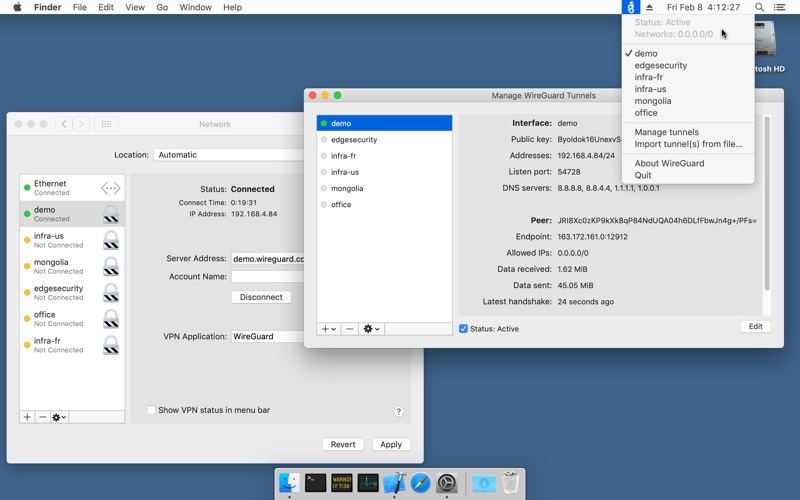
The core strength of the WireGuard VPN client lies in its straightforward configuration management. Instead of burying settings behind complex menus, the application focuses on getting your tunnels up and running with minimal friction. Users can interact with the utility in several practical ways:
- Archive and File Importing: Easily import pre-configured tunnel settings directly from configuration files or compressed archives provided by your network administrator or VPN provider.
- Custom Creation: Build new tunnel configurations completely from scratch using the built-in editor, giving you full control over public keys, endpoints, and routing rules.
- Rapid Connection Toggling: Quickly enable or disable specific tunnels directly from the macOS interface for instant security adjustments.
Who Is This Security Utility For?
Because the app is categorized under security and utility tools, it appeals to a specific audience of privacy-conscious individuals and network administrators. If you run your own private server or use a third-party service that supports the protocol, this app acts as the perfect lightweight bridge. It is ideal for remote professionals needing secure access to corporate environments, as well as home lab enthusiasts who want to maintain encrypted connections back to their personal networks without sacrificing hardware performance.
Ongoing Development and Future Outlook
This software is currently undergoing rapid development. The team at WireGuard LLC actively listens to user feedback to implement new features and further optimize performance. Because the codebase is exceptionally clean and compact, the application runs efficiently on macOS, minimizing battery drain and maximizing throughput speeds. To get the most out of this tool, you will need an active server configuration; details on setting up your own server can be found on the developer's official website.
How to Get Started
If you are ready to upgrade your Mac's networking setup with a faster, more secure tunneling protocol, you can find the official application ready for deployment. To explore the interface and start managing your secure tunnels, head over to the official Mac App Store to download the utility directly from the developer.
Rate the App
User Reviews



Popular Apps










Editor's Choice